
ROB RUN Sales Center map guide
Open the in-game map and look for the van marked with a dollar sign at the Sales Center. That marker identifies the fence who buys stolen valuables. Looty Bay also has a fence marked with a dollar sign.
Interactive map key: select a fence location
Choose the place named on your in-game map. This key explains the markers; exact positions and other players are visible only in the game.
Looking for the district layout? Open the Sales Center map on MetaForge to search for individual markers. Use the location key below to identify the right fence.
District Sales Center · $ van
Check your settlement access, then find the marked fence. See the publisher footage below for the van and counter. Follow the Sales Center handoff checklist.
Looty Bay · $ van
On the Looty Bay map, find the dollar-sign van instead. Confirm you are looking at the city map before you commit to a district detour. See the sale and cash pickup steps.
How to recognize the Sales Center fence
- Find the Sales Center on your map. Check your active map before leaving, especially if you haven’t used the location this session.
- Look for the $ van. Use the van marker to identify the fence. A center name by itself cannot tell you which point to approach.
- Check the counter after selling. Pick up the cash before leaving. Follow the sell-and-collect checklist for the handoff.
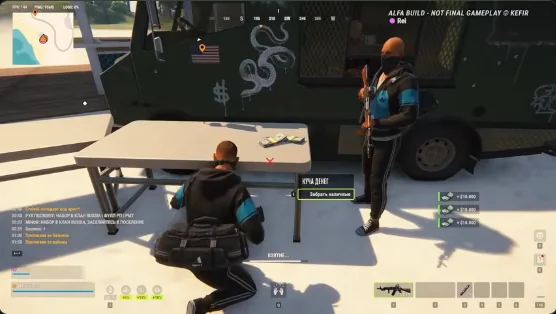
Do you need to rent land to sell at the Sales Center?
In its progression announcement, Kefir lists Sales Center selling as a perk you unlock by renting land and becoming a Settlement Resident. If you are still based at Lenny’s Motel and have no plot, plan your first cash-out around the Looty Bay fence. If you already rent a plot, confirm the van interaction before making it the endpoint of a timed run.
Kefir’s progression announcement explains the resident perk. Kefir’s rental guide explains how to find a vacant plot.
Plan the trip before you pick up valuables
- Start at the exit you would take after looting. On the map, follow the route from that exit to the marked van. Check how much road you would need to travel and where you might have to double back.
- Pick a backup buyer while you are scouting. Find the Looty Bay fence on the map and compare both approaches. When a marker or the expected interaction is unavailable, switch to the buyer you can confirm.
- Pick your finish line. For a cash run, count the drive, any wait and the time to collect the cash. If you also want to compare getting back to storage, use a separate label with that later endpoint.
When to use the Looty Bay fence instead
- You can confirm the Sales Center route and handoff
- Use the Sales Center if it fits your exit plan. Keep the local fence marked as your backup.
- The marker or sale prompt is unavailable
- Use the confirmed Looty Bay van. Make that decision before you wait with valuables in your bag.
- You are already carrying cash
- Decide where to store it. The storage guide covers Lenny, your base and laundering.
Source checked . Kefir’s selling guide identifies both fence locations and explains the cash pickup.